
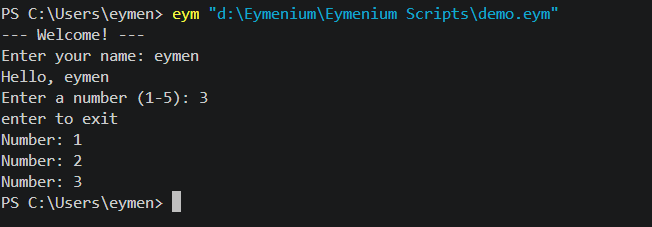
About Eymenium Language
Eymenium (.eym)
Eymenium is an independent programming language that features a custom keyword set and clean lexical structure inspired by indentation-based syntaxes. It includes a built-in standard library with functions for formatted output, input handling, system command execution, and object introspection.
Key Features
- Indentation-Based Syntax: Block structure defined by consistent whitespace and indentation rules.
- Custom Keywords: Modern keywords for control flow, class definitions, exception handling, and async execution.
- Integrated Standard Runtime: Native built-ins for I/O (
out,getuser), system interaction (cmd), type checking (kind), and collection handling (sizeof,nums). - Interactive REPL & CLI: Built-in command-line runner and interactive Read-Eval-Print Loop shell.
Language Architecture
The reference runtime processes Eymenium source through a four-stage pipeline:
- Lexical Analysis: Scans
.eymsource into token streams while maintaining indentation contexts. - Grammar Translation: Maps Eymenium grammar tokens and operators into internal representations.
- Compilation: Compiles token structures into executable bytecode objects.
- Virtual Machine Execution: Executes bytecode inside an environment pre-bound with Eymenium runtime functions.
Language Reference
Control Flow & Definitions
| Eymenium Keyword | Purpose | Example |
|---|---|---|
exp | Define a function | exp greet(): |
blueprint | Define a class/structure | blueprint Person: |
chk | Conditional check (if) | chk x > 0: |
orchk | Secondary check (else if) | orchk x < 0: |
nah | Fallback branch (else) | nah: |
loop | Iterate over collections | loop i within items: |
spin | Loop while condition holds | spin active: |
back | Return value from function | back result |
stop | Terminate loop | stop |
skip | Move to next loop iteration | skip |
nop | No-operation placeholder | nop |
Operations & Constants
| Eymenium Keyword | Purpose | Equivalent Concept |
|---|---|---|
yes | Boolean true | true |
no | Boolean false | false |
null | Absence of value | null / nil |
also | Logical AND | && |
either | Logical OR | || |
deny | Logical NOT | ! |
within | Membership check | in |
same | Reference equality | === |
Exception Handling & Modules
| Eymenium Keyword | Purpose |
|---|---|
attempt | Begin protected block (try) |
catch | Handle raised error (catch / except) |
atlast | Always execute after attempt block (finally) |
throw | Raise an exception |
using | Scope context resource manager |
called | Bind alias name |
fn | Anonymous / lambda function |
add | Import module |
outof | Import specific symbols from module |
Asynchronous Operations
| Eymenium Keyword | Purpose |
|---|---|
keep | Mark function as asynchronous (async) |
hold | Pause execution until async operation resolves (await) |
Built-in Functions
Eymenium includes a core runtime library loaded globally into every execution context:
| Function | Description |
|---|---|
out(...) | Print output to standard output |
getuser(prompt) | Read input from standard input |
cmd(command) | Execute system command directly in shell context |
sizeof(item) | Return length/element count of collection |
kind(item) | Return system type of an object |
grab(obj, attr) | Read object attribute dynamically |
put(obj, attr, val) | Set object attribute dynamically |
has(obj, attr) | Check if attribute exists on object |
nums(start, stop) | Generate numeric sequence |
Usage Guide
Installation & Setup
- Clone or download the
eymeniumexecutable toolchain (eym) onto your system path. - Mark the toolchain as executable:
chmod +x eymScript Execution
Execute .eym files using the Eymenium runner:
eym script.eymPass command line parameters into the program:
eym script.eym --mode=production --verboseInteractive REPL
Launch the interactive REPL shell by invoking the engine without parameters:
eymEymenium REPL (.eym) -- type 'exit' or Ctrl-D to quit
eym> exp greet(name):
...> out("Hello, " + name)
...>
eym> greet("World")
'Hello, World'
eym> exitSyntax Examples
1. Basic Input/Output & Control Flow
exp main():
    name = getuser("Enter name: ")
    chk sizeof(name) > 0:
        out("Hello,", name)
    nah:
        out("No name provided!")

chk __name__ same "__main__":
    main()
2. Iteration and Conditions
count = 3

spin count > 0:
    out("Countdown:", count)
    count -= 1

loop i within nums(1, 5):
    chk i % 2 == 0:
        out(i, "is even")
    nah:
        out(i, "is odd")
3. Object-Oriented Blueprint & System Shell Invocation
blueprint Device:
    exp __init__(self, label):
        self.label = label

    exp run_diagnostics(self):
        out("Testing device:", self.label)
        cmd("echo Diagnostic task complete")

dev = Device("Primary Server")
dev.run_diagnostics()
4. Exception Handling
attempt:
    result = 100 / 0
catch ZeroDivisionError called err:
    out("Error caught successfully:", err)
atlast:
    out("Finished attempt block execution.")